
Plan, Assign, and Never Miss a Maintenance Task
Build recurring preventive schedules, raise ad-hoc work orders, assign the right technician, and plan around shifts — all in one place, automatically routed to the field.
Never Miss a Maintenance Task Again
Unplanned machine failures don't happen randomly — they happen because maintenance was skipped, delayed, or forgotten. Smart Maintenance Task Manager eliminates that risk by automating your entire maintenance schedule.
Build recurring tasks for every machine, production line, and production site. Set the frequency — daily lubrication checks, weekly inspections, monthly overhauls — and Smart Maintenance Task Manager automatically routes each task to the right technician at the right time.
Need a task done several times a day? Schedule it up to 12 times a day, each visit at its own fixed time (say 06:00, 14:00, and 22:00). Every visit is tracked separately — completed in any order, and overdue on its own the moment its time window passes — so a missed morning round never hides behind a completed evening one. Available for your site on request.
- Recurring schedules: daily, weekly, monthly, custom — or by meter: running hours, distance, cycles
- Multiple times per day — up to 12 fixed-time visits daily, each tracked and overdue on its own
- Assign tasks to individual technicians or teams
- Multi-technician assignment — assign one task to an entire team
- Push notifications when tasks become overdue (mobile + email)
- Automatic escalation to supervisors after configurable threshold
- Grace period settings per task type
- Supervisor approval workflow — dual sign-off for quality-controlled environments
- Schedule across unlimited machines
- Multi-site scheduling from one account
- View all upcoming tasks on a calendar
- Bulk task creation for production lines
- Task reassignment and escalation
- Historical completion rates per asset
1. Build Schedule
Set frequency per machine
2. Auto-Assign Tasks
Routes to the right technician
3. Technician Completes
On a mobile app, with a checklist + photo
Reassign Without Rebuilding the Schedule
See every upcoming task on the calendar and reassign any task to another technician when shifts change or someone's out. Open the task in the calendar, pick a different technician from the dropdown, save — the reassignment syncs to the mobile app on the next sync. No rescheduling from scratch, no manual edits across multiple records.
And if a task is scheduled or reassigned onto a line that's in an active shutdown on that date, the planner gets a heads-up first — a warning, not a hard block — so work isn't booked onto a stopped line by accident.
What stays intact
- The task's date, time, and checklist are unchanged
- History and audit trail remain on the same task
- Original assignment is logged with the change reason
- The newly-assigned technician sees the task on their next sync
Handle the Unplanned, Not Just the Scheduled
Not every job is on the calendar. When something comes up, a manager can raise an ad-hoc work order against any equipment point — an instruction, an assignee, scheduled for the same day — without touching the recurring schedule. And when a technician reports a problem in the field, that repair request can be converted straight into a work order in one click, so the fix is assigned and tracked like any other task.
From report to repair
- Create a one-off work order at any equipment point
- Convert a technician's repair request into a work order
- Inherits the equipment point, instruction, and assignee
- The original request is marked resolved automatically
Service by What the Machine Has Actually Done
Not every machine wears by the calendar. A compressor that ran 400 hours this month needs attention sooner than one that ran 150, and a fixed monthly service either comes too early for one or too late for the other. Smart Maintenance Task Manager lets a machine carry one or more meters — running hours, distance, cycles, or a custom unit — and ties the maintenance rule to the meter instead of the date.
“Service every 250 running hours” then means exactly that: the task sits on the calendar at its estimated date and is pulled to today the moment a reading crosses the interval — the reading is the truth, the date is the estimate. The readings come from scheduled reading rounds a planner puts on the calendar like any other task: one job that walks a technician through every counter on a line, in order, offline, with the readings syncing like everything else — and anyone doing another job at a metered machine can add a reading while they are there. Planners see a projected next-due date for every rule, computed from how fast the meter is actually moving.
- Meters per machine: running hours, distance, cycles, or a custom unit
- Maintenance rules tied to a meter interval instead of the calendar
- Task pulled to today the moment a reading crosses the interval, not on a fixed day
- Counters read on the phone, offline — in a scheduled reading round that walks the technician from machine to machine, or optionally during any other task at the machine
- Projected next-due date for every rule, from the real usage rate
- A copied or moved machine keeps its meters and rules
- A counter nobody has read past its tolerance is reported to the people who plan and assign the work — once when it goes quiet, with how often technicians could not read it and why
- Calendar schedules stay available for everything that does wear by time
Counters get read on a planned round, not asked for at every job
A projection is only as good as its newest reading, so reading a counter is a scheduled job like any other. A planner creates a reading task, ticks the counters it covers — one machine or a whole line, in the order a technician would walk it — and gives it a frequency: daily, weekly, monthly, or several times a day where a site needs it. It is assigned, lands on the phone, and goes overdue like any other task. Ordinary work at a metered machine never demands a reading, but a technician can add one while standing there, and a reading taken that way closes a single-counter reading task already due for it, so nobody is sent back to the same display later that day.
- Reading tasks appear in the technician’s inbox like any other task
- One round covers up to sixty counters across a whole line, in the order a technician actually walks it
- A reading taken during any other job at that machine closes a single-counter reading task already due for it — a round of several counters stays open until every counter is answered
- Every missed reading round is reported once, in one daily digest to the people who can reassign it — naming the counter, the machine, the day it was due, and who it was assigned to, or that nobody was
- A reading round cannot be closed with a blank: every counter needs a value, an “unchanged” for an idle machine, or the reason it could not be read
- A round closed without a single counter read is named to the office, with who it was assigned to
Maintenance Task Management: Assign, Track, and Complete with Evidence
Scheduling tells you when a maintenance task is due. Task management tells you what got done, by whom, and with what evidence. Every task in Smart Maintenance Task Manager is a structured workflow — checklist, photo evidence, completion timestamp, technician identity — not a free-text note.
Each completed task becomes part of a permanent, exportable audit trail. When an inspector, customer auditor, or insurance adjuster asks “When was this machine last serviced?”, the answer is one filter away.
- Step-by-step checklists per task type
- Photo evidence required for sign-off
- Technician identity + timestamp on every step
- Free-text observations and remarks
- Barcode & NFC tag scan for asset confirmation
- Repair-request escalation from inside a task
- Threshold readings (temperature, pressure, hours)
- Meter readings (running hours, distance, cycles) recorded during the task, offline
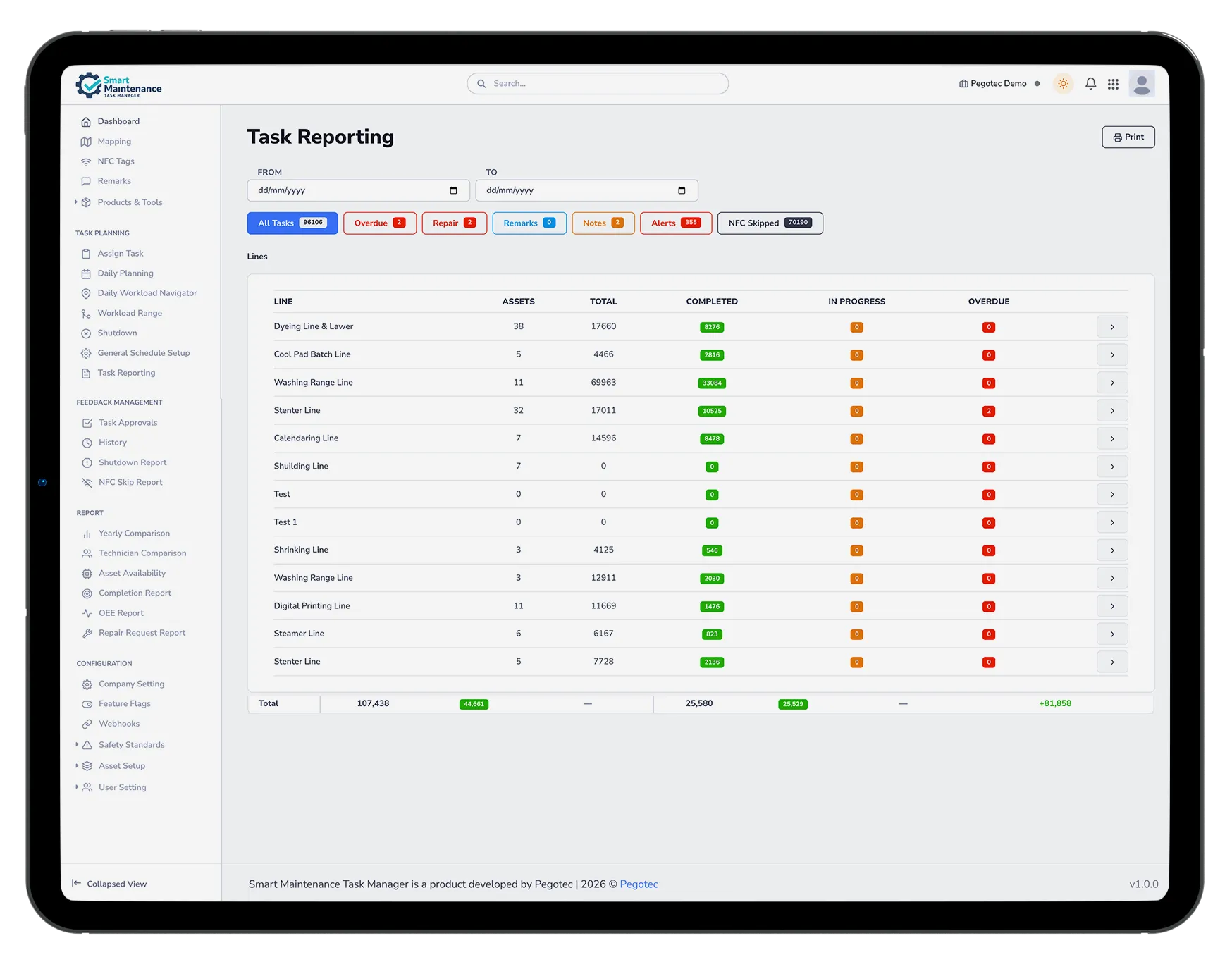
- Reading rounds are ordinary tasks: one job lists every counter on a line in walking order, is scheduled and assigned like any other task, and appears in the technician’s list, on the calendar and in the task report
- Real-time completion status on the dashboard
- Tasks queue offline and sync when reconnected
- Per-task safety procedure enforcement
- Re-open completed tasks with audit reason
- Export per-asset history to PDF or CSV
- Filterable history by date, asset, technician
- Photo gallery per task for visual records
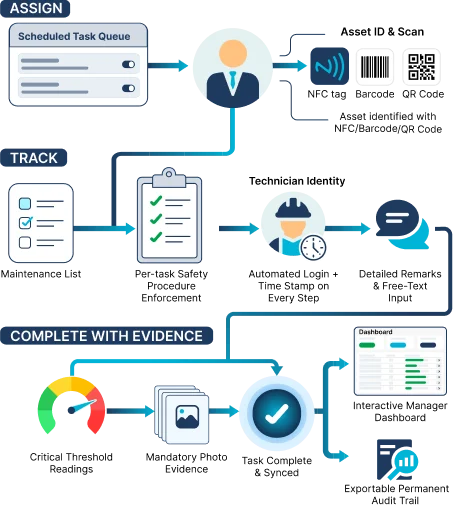
1. Open Task
NFC scan or task list on the mobile app
2. Work the Checklist
Structured steps, safety gates, threshold readings
3. Attach Photo
Visual evidence of completion
4. Submit + Audit
Timestamped, synced, exportable
Know Who's Available Before You Assign
Define shifts and rotation patterns, assign technicians with staggered crews, record absences and extra time, and see the whole team on one roster calendar. When a planner assigns or reschedules a task, Smart Maintenance Task Manager shows at a glance whether the technician is on shift — and gives a gentle warning if they're off or absent. A warning, never a hard block: the planner always has the final say. Technicians see their shifts in the mobile app and log time off in a tap, and any absent technician who still has work assigned is flagged to their manager before it becomes a gap.
Rotation Patterns
Eight ready-made industry presets — Continental, DuPont, Panama 2-2-3, 4-on-4-off, and more — or build a custom pattern that matches your plant
Roster Calendar
The whole team's shifts, absences, and extra time on one calendar, filtered per production site
Availability at Assignment
Availability badges in task assignment and daily planning show who's on shift before you commit
On the Technician's Phone
Technicians see their own roster in the mobile app and log time off in a tap — no phone calls, no paperwork
- Unified shift catalog with rotation patterns — eight industry presets or fully custom
- Roster calendar with per-site filtering
- Availability badges in task assignment and daily planning
- Optional on-call routing — escalations can prefer whoever's on shift
- Advisory warn-and-confirm — never blocking
- Absences and one-off extra time
- Absent technicians who still hold work are flagged to their manager
- Optional per company — adopt gradually, crew by crew
Fully optional, per company
Shift planning is enabled per company, and technicians without a shift assignment simply count as always available — nothing changes for them. Start with one crew, roll out gradually, and for multi-site plants the shifts and rosters are production-site aware from day one.
Dedicated Lubrication Scheduling for Industrial Equipment
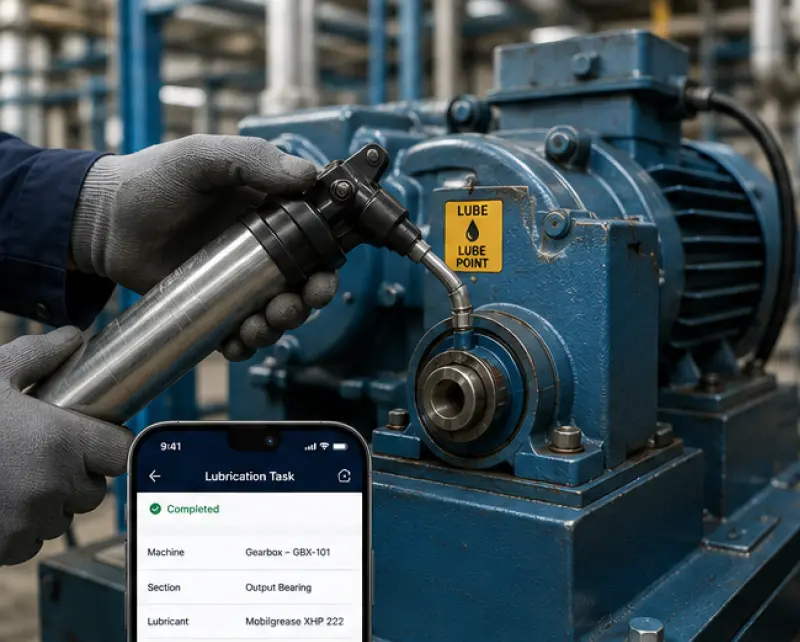
Lubrication is one of the most important — and most commonly neglected — types of preventive maintenance. Smart Maintenance Task Manager has dedicated lubrication task types with specific fields: product used, quantity applied, and technician confirmation.
Schedule lubrication intervals for each machine section, assign them to trained technicians, and maintain a complete record of every lubrication action.
- Dedicated “Lubrication” task type
- Track the product used and the quantity applied
- Lubrication product catalog (type, viscosity, manufacturer)
- Scheduled lubrication intervals per machine section
- Photo evidence of completion
- Complete lubrication history per machine
- Product usage visibility — see which lubricant was applied and how much
- Historical lubrication records per machine for audit and analysis
Capabilities in Detail
Every capability in this area, with a one-line note on what it does.
See Every Feature in a Live Demo
Our team will walk you through the platform — web and mobile — tailored to your industry and maintenance workflows.