
How Maintenance Teams Use Smart Maintenance Task Manager
Industry scenarios built from common maintenance challenges across textiles, food processing, chemicals, automotive, multi-site operations, and pharmaceuticals — and how Smart Maintenance Task Manager would address each.
Note: The scenarios below are illustrative — composed from real maintenance challenges and recurring patterns we have observed across industrial deployments. Company sizes, named individuals, and specific incident percentages are representative, not from a single identified customer. For anonymized named deployments and references on request, please contact us.
From Paper Lubrication Sheets to Zero Missed Tasks in a 400-Loom Weaving Facility
Textile manufacturer · 380 employees · 400 rapier looms · 12 technicians
The Situation
A garment manufacturer operates 400 rapier looms across 4 weaving halls. Lubrication maintenance is critical — an under-lubricated loom causes thread breaks, weft defects, and fabric rejects that cost more than the lubricant itself. The facility runs 2 shifts per day, 6 days a week.
“We had a paper system — a printed checklist for each hall, attached to a clipboard near the entrance. Technicians were supposed to sign off each loom row every day. But when we audited the sheets, we found that on average 40% of the rows were either not signed or signed as complete when they hadn’t been done. We had no way to know.”
Specific Problems
- No way to verify if a lubrication task was actually completed or just signed off
- No record of which lubricant product was used or in what quantity
- Night shift had a different paper form — records were never combined
- Supervisors couldn’t see which technicians were completing work and which weren’t

How They Use Smart Maintenance Task Manager
Setup
- 400 looms entered as assets under 4 production sites (weaving halls)
- Each loom has 6–12 task points (crankshaft, beam, warp stop, etc.)
- NFC tags affixed to the front panel of every loom
- Lubrication tasks scheduled daily per shift, assigned to technician zones
Daily Workflow (Technician)
Supervisor View
- Dashboard shows live completion percentage by weaving hall
- Any task overdue by more than 30 minutes triggers an alert
- End-of-shift report exported to Excel automatically
Offline Capability
The facility has poor WiFi coverage between loom rows. Technicians work offline; the tablet syncs each time they pass near the hall entrance where the router is located.
The Result
Illustrative scenario based on common industry challenges.

Passing a Food Safety Audit After Years of Paper-Based Maintenance Records
Food & beverage producer · 220 employees · 6 production lines · 8 technicians
The Situation
A bottling and packaging plant processes over 50,000 units per day. The facility is BRC-certified and undergoes annual third-party audits. Maintenance on processing equipment — filling machines, labeling units, conveyors, and CIP systems — must be fully documented.
“Our auditor found 23 maintenance records that were either missing dates, missing technician signatures, or couldn’t be cross-referenced with the maintenance schedule. We passed the audit but received a minor nonconformity. The following year, we needed to show corrective action.”
Specific Problems
- Paper records were sometimes lost or filled out incorrectly
- No way to prove that maintenance was done at the right time by the right person
- Finding records from a specific machine over 6 months took 2 days
- Cleaning and lubrication records were in separate binders — auditors had to cross-reference manually
How They Use Smart Maintenance Task Manager
Setup
- 6 production lines with all machines entered as assets
- Maintenance and CIP tasks scheduled per line
- Food-grade lubricant product catalog set up with product names and application rates
- Technician roles assigned — only trained technicians can complete lubricant tasks on food-contact equipment
Audit-Ready Workflow
LOTO Enforcement
- Machines requiring isolation have LOTO enabled in the system
- Technician cannot start checklist without completing safety procedure acknowledgment
- LOTO acknowledgment logged with timestamp and user attribution
The Result
Illustrative scenario based on common industry challenges.
Enforcing Safety Procedures on Every Maintenance Task Without Exception
Chemical manufacturer · 160 employees · 14 technicians · HSE compliance required
The Situation
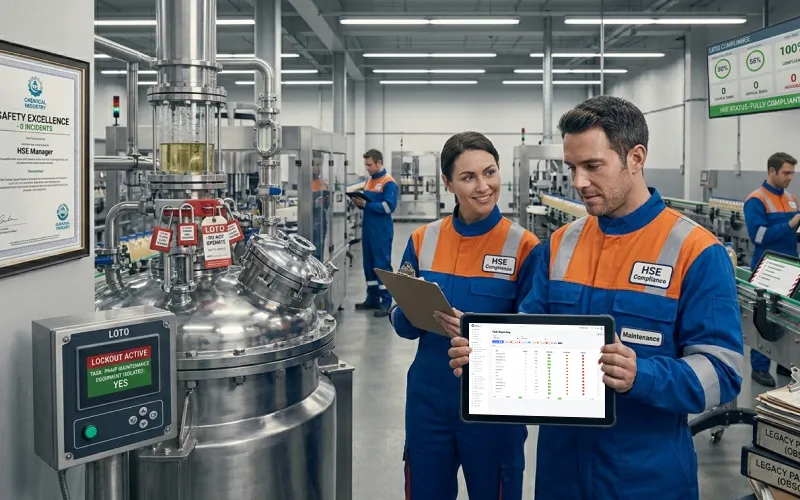
A specialty chemicals plant operates high-pressure reactors, heat exchangers, and pump systems that require strict lockout/tagout (LOTO) procedures before maintenance. Despite safety training, incidents had occurred where maintenance began before equipment was fully isolated.
“We had the safety procedures printed and posted on every machine. We had training records. But when an incident happened and we investigated, we found that the technician had started work without following the full isolation procedure. The paper checklist was on the wall. He just didn’t look at it.”
Specific Problems
- Safety procedures existed on paper but were not enforced digitally
- No evidence that technicians acknowledged safety steps before starting work
- Supervisors had no way to verify compliance without physically watching each task
- Incident investigation had no documentation to show what steps were followed
How They Use Smart Maintenance Task Manager
Setup
- All high-risk equipment flagged as “lockout required” in asset settings
- Full LOTO procedure defined as a step-by-step safety checklist
- Technicians cannot skip the safety acknowledgment — it is a full-screen gate
Safety Workflow (Technician)
The Result
Illustrative scenario based on common industry challenges.

Preventing the Breakdowns That Stop the Entire Production Line
Automotive components manufacturer · 540 employees · 180 machines · 22 technicians · 3 shifts
The Situation
An automotive parts manufacturer runs 2 assembly lines with robotic welding cells, pneumatic presses, and precision machining centers. A single machine breakdown can halt the entire line for hours — causing missed shipping deadlines and customer penalties.
“We had an 8-hour production stoppage because a hydraulic pump failed. When we looked at the maintenance history, we found the pump hadn’t had a scheduled inspection in 4 months — even though our schedule said every 6 weeks. The technician had changed shifts. Nobody followed up. Nobody knew.”
Specific Problems
- Tasks fell through the cracks when technicians changed shifts or went on leave
- No automated follow-up when a scheduled task was missed
- Supervisors found out about missed tasks only when something broke
- Technician accountability was difficult across 3 shifts
How They Use Smart Maintenance Task Manager
Setup
- All 180 machines entered with full task point hierarchy
- Maintenance intervals configured per machine criticality (critical: weekly; standard: monthly)
- Technicians assigned by shift — the system knows who is responsible when
Shift-Based Workflow
Escalation
- Tasks overdue by 2+ hours escalate to the maintenance manager automatically
- Machines with missed maintenance flagged on dashboard with a warning badge
- Task completion record serves as sign-off before machine returns to production
The Result
Illustrative scenario based on common industry challenges.
One Dashboard for Three Factories in Two Countries
Manufacturing group · 1,200 employees · 3 sites · 2 countries · 3 maintenance teams
The Situation
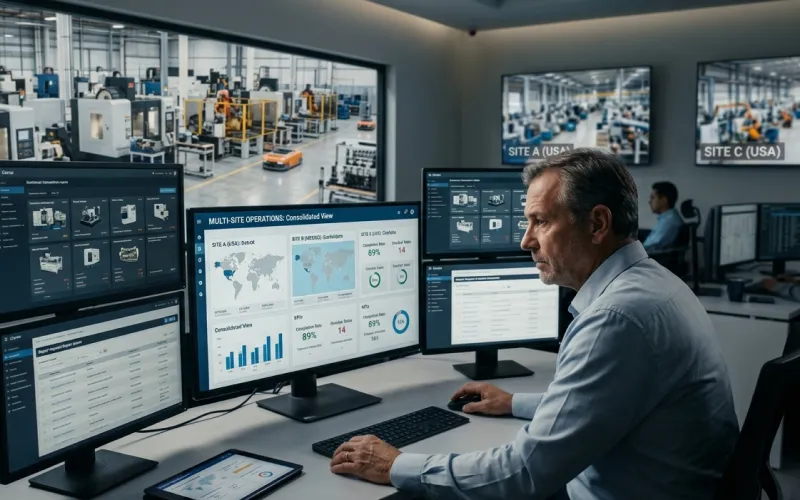
A manufacturing group operates 3 production facilities — two in the same country and one international site with a different maintenance team, different language, and different timezone. The operations director needs a consolidated view of maintenance status across all three.
“Every Monday I received three separate email reports from each site. Each one was formatted differently. Some had data, some had summaries. I spent 45 minutes every week trying to make sense of the combined picture. And I still couldn’t tell if everything was actually done or if the report just said it was.”
Specific Problems
- No consolidated view across sites
- Reports were manually compiled — subjective and inconsistent
- International site had different language — reports translated manually
- No way to compare performance between sites objectively
How They Use Smart Maintenance Task Manager
Setup
- All 3 sites set up as separate production sites under one account
- Each site has its own teams, schedules, and asset hierarchy
- Mobile app configured in local language per site
- Operations director has admin access to all sites
Director Workflow
Site Managers
- Each site manager sees only their own facility
- Teams operate independently — same system, separate data
- NFC tags, technician assignments, schedules all managed locally
The Result
Illustrative scenario based on common industry challenges.

GMP Maintenance Documentation That Survives an Inspection
Pharmaceutical manufacturer · 290 employees · 10 technicians · GMP compliance required
The Situation
A pharmaceutical facility produces oral solid dosage forms and is subject to regular GMP inspections. Equipment maintenance records are reviewed at every inspection. A previous inspection identified gaps in documentation completeness and raised questions about the integrity of paper-based records.
“The inspector asked for the maintenance history of our tablet press for the previous 12 months. We had records — but they were in different binders, some typed, some handwritten. One month was missing entirely because a supervisor had taken the binder to a meeting and it was misfiled. We passed, but the inspector noted the documentation system as a risk.”
Specific Problems
- Paper records in different binders — some typed, some handwritten
- Missing months due to misfiled binders
- No way to prove record integrity or prevent retroactive changes
- Inspector flagged documentation system as a risk
How They Use Smart Maintenance Task Manager
Setup
- All production and utility equipment entered with full hierarchy
- Maintenance tasks linked to equipment qualification documents
- All calibration and preventive maintenance tasks scheduled in the system
- Photo evidence required for all tasks on GMP-critical equipment
GMP-Ready Documentation
- Every task: timestamped, technician-attributed, with photo evidence
- System-generated — not handwritten, not manually compiled
- Full history retrievable by equipment, date range, or technician — in seconds
- LOTO procedures logged with full acknowledgment evidence
Inspection Workflow
The Result
Illustrative scenario based on common industry challenges.
Clearing the Maintenance Backlog During a Planned Shutdown
Chemical processing facility · 240 employees · 15 technicians · two planned turnarounds per year
The Situation
Between turnarounds, the plant runs around the clock. Technicians regularly spot non-urgent issues during routine maintenance — a slight pump-seal seep on a non-critical line, a flange that needs re-torquing on a secondary reactor, a heat exchanger that’s due for an internal inspection. None of these are fix-today problems. None of them belong on a normal calendar either.
“Our problem wasn’t finding the work — it was holding onto it. A technician would spot something during a routine PM, we’d agree it could wait for the next turnaround, and then it would live on a sticky note for four months. Half the time it was forgotten. The other half it surprised us mid-shutdown when we already had a packed scope.”
Specific Problems
- Non-urgent repairs lived on sticky notes — some forgotten, some surfaced too late
- Shutdown-only tasks (vessel inspection, alignment, overhaul) cluttered the normal calendar and looked perpetually overdue
- Turnaround scope was built in spreadsheets each cycle — planning took days, items got missed
- No structured trail of what was deferred, by whom, and how long it had been sitting
How They Use Smart Maintenance Task Manager
Defer-to-Shutdown from web or field
- A repair flagged during a routine task is triaged: fix now, defer, or dismiss
- Web supervisor defers from the repair report; technicians can defer from the mobile repair form on the spot
- Deferred items join the Deferred Maintenance Backlog, scoped to the relevant asset or production line
- Aging-backlog reminder surfaces items that have been sitting too long, so nothing rots in the queue
Shutdown-Only Tasks stay out of the calendar
- Recurring work that needs equipment stopped — vessel internal inspection, exchanger pull, alignment — is marked shutdown-only
- These tasks never appear on the running schedule and never count as overdue
- They surface as candidates for the next shutdown of their scope, with a "due since last shutdown" hint
- Asset criticality (critical / important / standard / minor) guides the "fix now vs defer" decision at the point of triage
Building the turnaround work list
The Result
Illustrative scenario based on common industry challenges.
See How Smart Maintenance Task Manager Fits Your Operation
Tell us your industry and current maintenance challenges. We’ll walk you through a demo tailored to your specific workflow.
Mention your industry when you book — we’ll prepare relevant examples.