
Smart Maintenance
Task Manager
The maintenance management software built for factory floors. Schedule preventive tasks, build a complete, timestamped record of executed work, scan NFC tags on machines — and manage it all from one platform.
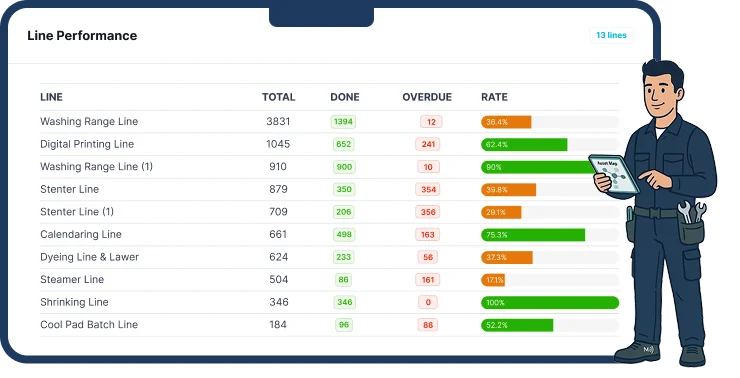
Smart Maintenance Task Manager is a cloud-based CMMS (Computerized Maintenance Management System) developed by Pegotec for industrial manufacturing, food processing, textiles, chemical, automotive, pharmaceutical, and mining operations. The platform consists of a web dashboard for managers and a mobile app (iOS and Android) for field technicians — both working in sync. On the factory floor, technicians can complete tasks, take photos and scan tags without an internet connection.
* Based on reported outcomes from early-adopter deployments. Individual results vary by facility size, maintenance maturity, and rollout scope.
Maintenance Without Structure Costs Production Time
Most factories still rely on paper forms, whiteboards, and spreadsheets to manage maintenance. The result: missed tasks, untracked work, and machines that fail at the worst possible moment.
Missed Maintenance Tasks
Without a system, maintenance schedules live in spreadsheets or people's heads. Tasks are skipped, machines wear out faster, and failures catch your team off guard.
No Visibility into What's Done
How do you know if a lubrication check was actually completed? Paper forms get lost. Spreadsheets are outdated by the time you read them. Management has no real-time picture.
Reactive Maintenance Costs More
Repairing after a breakdown usually costs far more than preventing the failure. Without scheduled maintenance, your team is always reacting—and production always pays the price.
A Maintenance Platform
Built for the Factory Floor
Smart Maintenance Task Manager gives your team a single system to schedule, assign, track, and report on every maintenance task — from the office dashboard to the technician's smartphone.

Scheduling
Works Offline
Reporting
Multi-site
Everything Your Maintenance Team Needs
From automated schedules to NFC machine tags — Smart Maintenance Task Manager covers every part of your maintenance workflow.
Stop Missing Maintenance Tasks
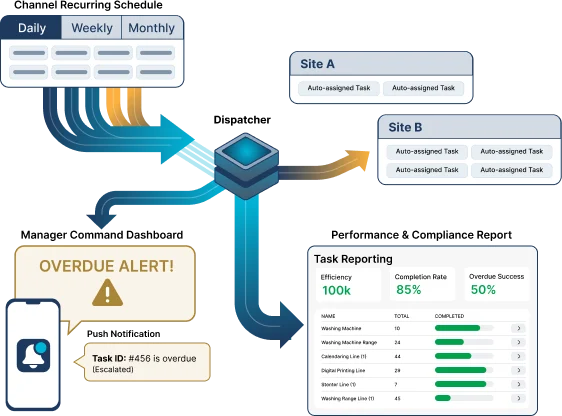
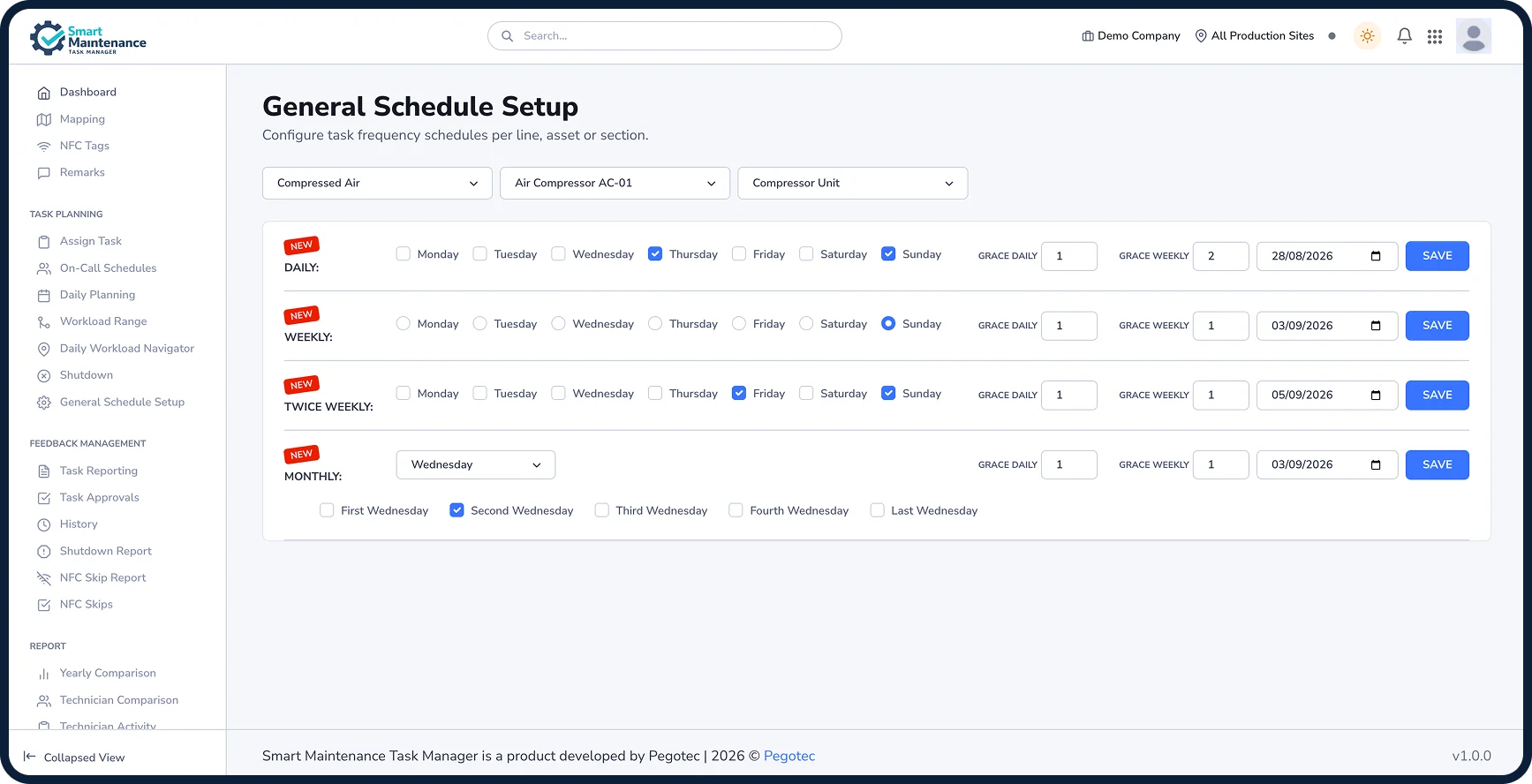
Build recurring maintenance schedules for every machine, production line, and production site. Daily, weekly, and monthly — Smart Maintenance Task Manager sends tasks to the right technician at the right time.
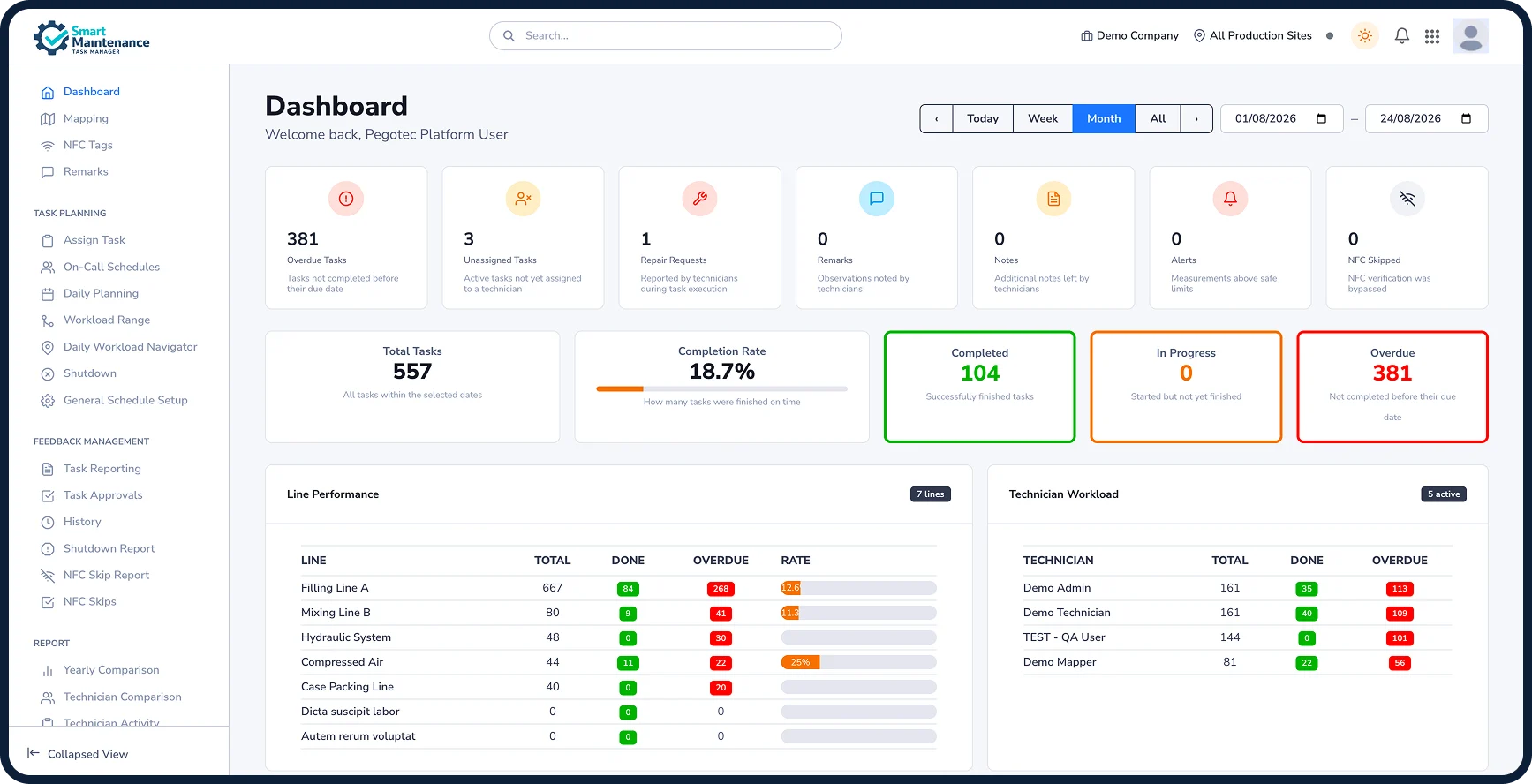
When a task is overdue, managers see it instantly on the dashboard. No task falls through the cracks.
- Recurring task schedules (daily, weekly, monthly)
- Several visits a day (up to 12), each with its own time window and its own overdue (available on request)
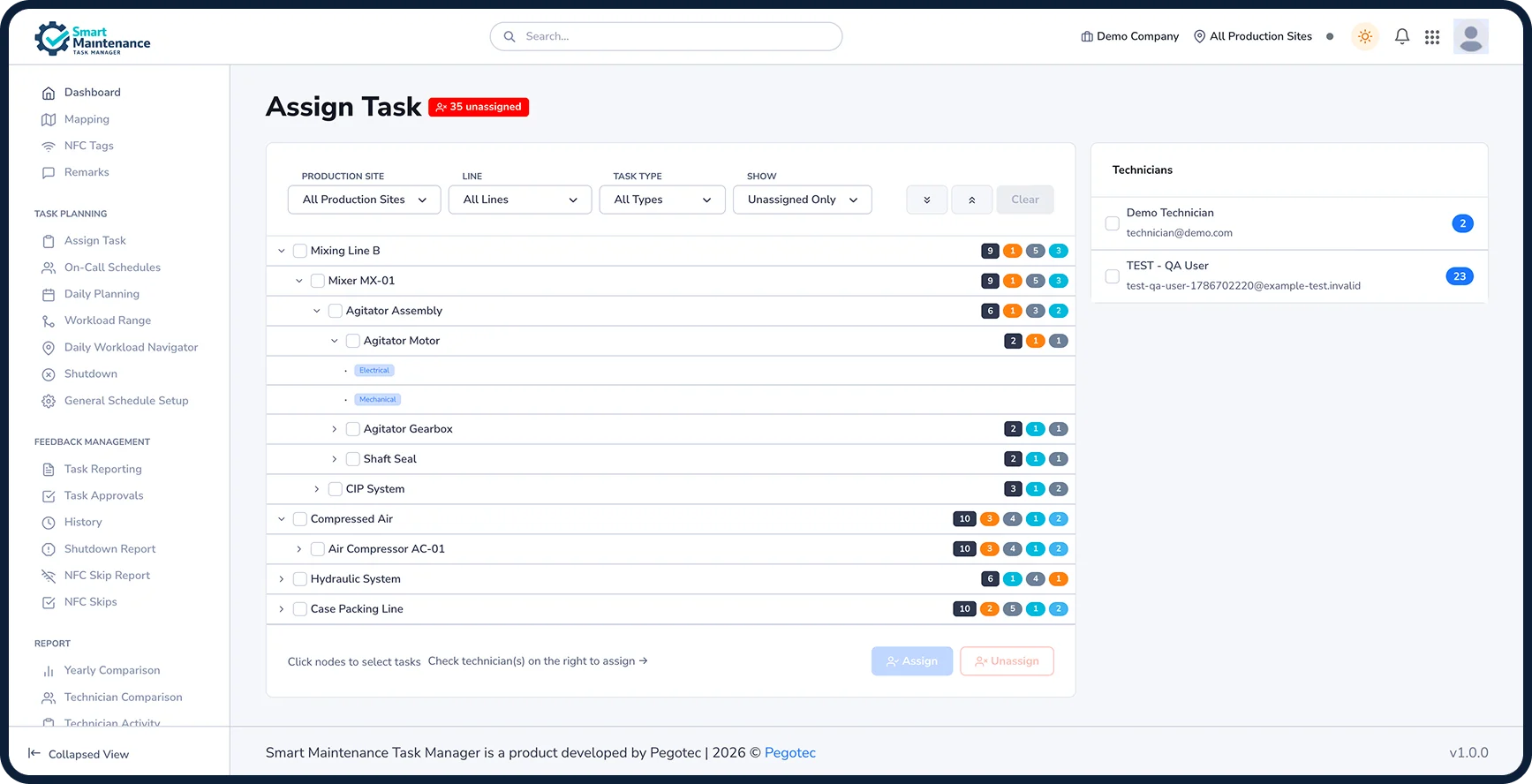
- Assign a recurring task once — every occurrence goes to the same technician
- Multi-technician assignment: one task to several technicians at once (optional — your Admin switches it on)
- Push notifications when tasks become overdue
- Each person chooses which alerts reach their phone, can take a daily summary instead, and can set quiet hours
- Escalation of overdue work to supervisors, then managers, after the hours you set (optional — your Admin switches it on)
- Multi-production site and multi-site scheduling
- Grace periods: a company default for daily and for longer schedules, overridable per schedule
The App That Works Even When the Network Doesn't
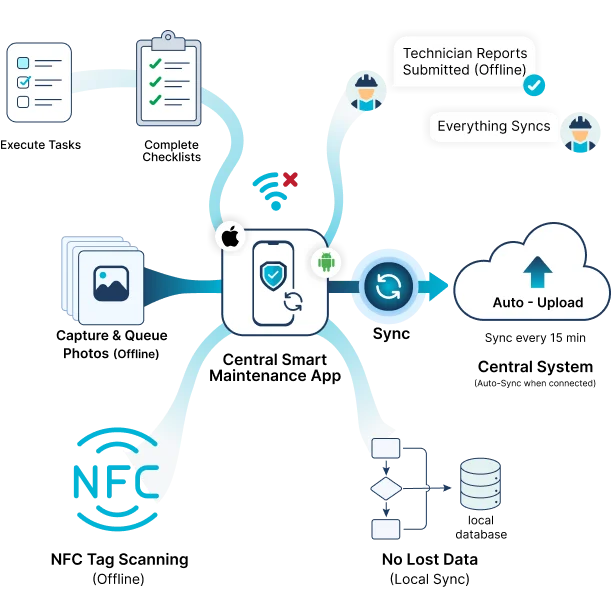
Factory floors, basements, and remote production areas often have no internet connectivity. That is why the Smart Maintenance Task Manager app was built from the ground up as an offline-first app.
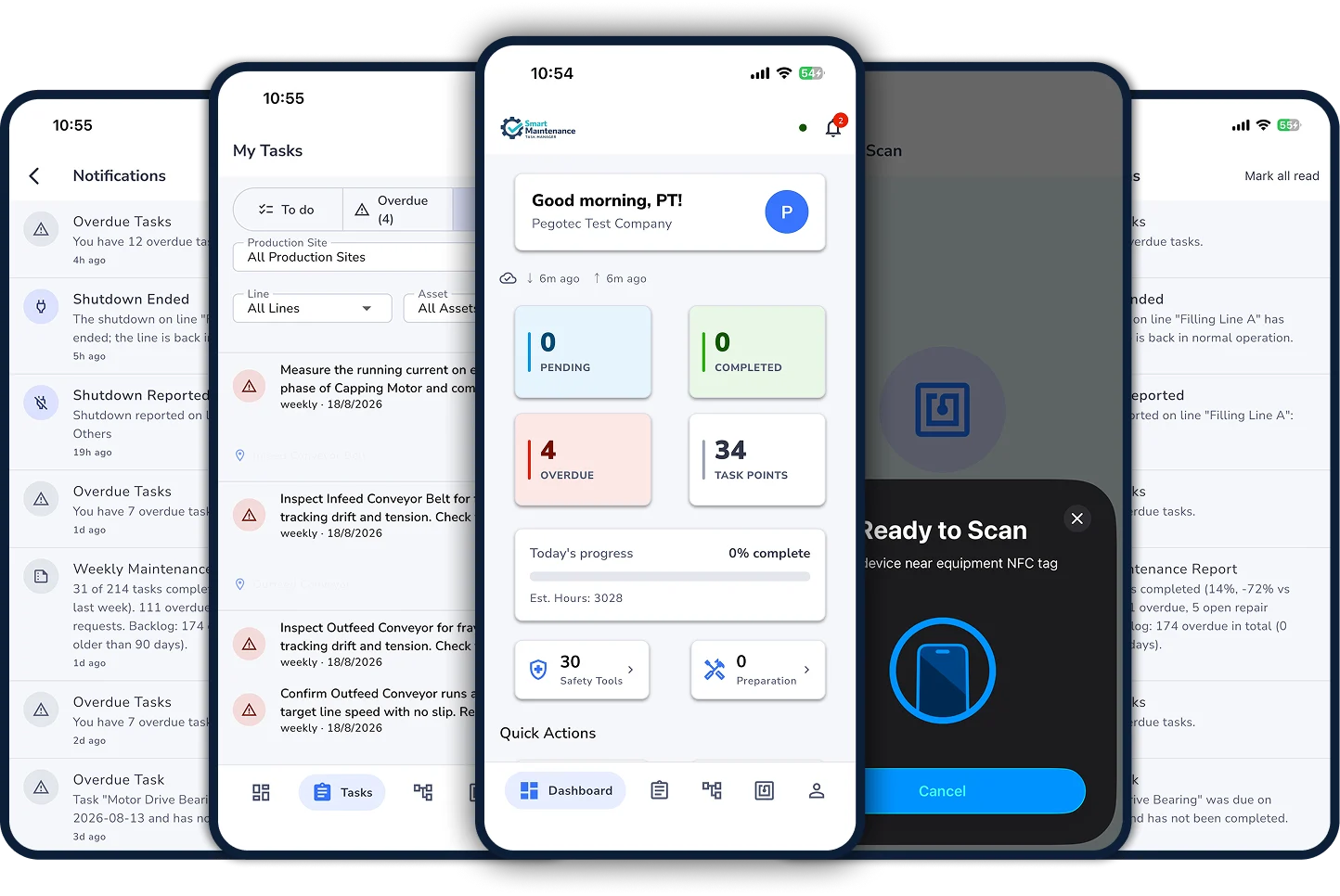
Technicians execute tasks, complete checklists, capture photos, and submit reports without any internet connection. When the device reconnects — even hours later — everything syncs automatically to the central system.
Work done offline stays on the phone until the server has accepted it.
- Fully offline — execute tasks with zero connectivity
- Automatic sync when the connection returns
- Works on iOS and Android phones and tablets
- NFC tag scanning works offline
- Photos captured offline are queued and uploaded when connected
- Background sync about every 15 minutes on Android, and as often as iOS allows
- Available in 14 languages — set on each phone
Map Every Machine, Line, and Production Site
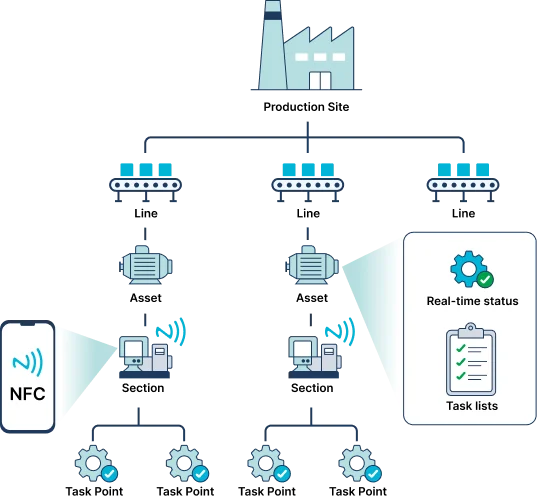
Smart Maintenance Task Manager supports a 5-level asset hierarchy so you can organize maintenance exactly how your facility is structured.
From the top-level production site down to the individual task point on a machine, every piece of equipment has a complete maintenance history, assigned tasks, and real-time status.
- 5 levels: Production Site → Line → Asset → Section → Task Point
- NFC tags on machines, sections or individual task points for instant identification
- Full maintenance history per asset
- Duplicate and reorganize hierarchy as your facility grows
- Multi-site: manage multiple factories from one account
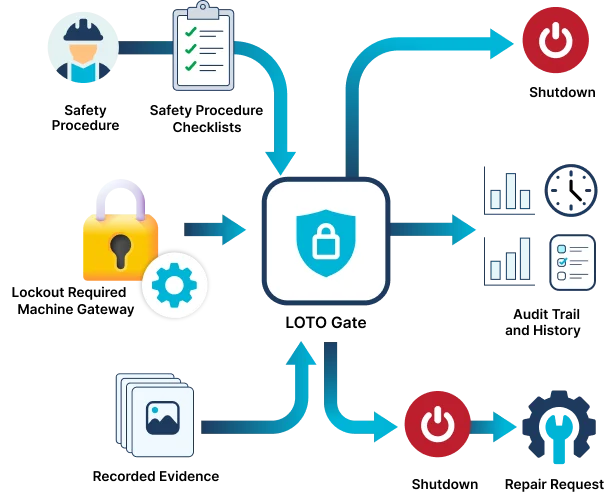
Safety Checks Before the Work Starts
Before their first task each day, technicians confirm your company's safety checklist. Task points flagged as lock-out required open with a full-screen lock-out/tag-out (LOTO) reminder that the technician must confirm before the task form appears. These confirmations are prompts on the phone, not stored records — keep your LOTO and permit records in your existing system.
Every completed task is recorded with who did it, when, the values entered, and photos where you require them.
- Lock-out/tag-out reminder screen on task points flagged as lock-out required
- Your company's safety checklist on the first task of each day
- The technician confirms both before continuing
- Records of completed work: who, what, when, with photos where required
- Shutdown and repair request management
Lockout/Tagout (LOTO) is a safety standard for controlling hazardous energy. Learn more: OSHA 29 CFR 1910.147 →
One Platform. Web Dashboard + Mobile App.
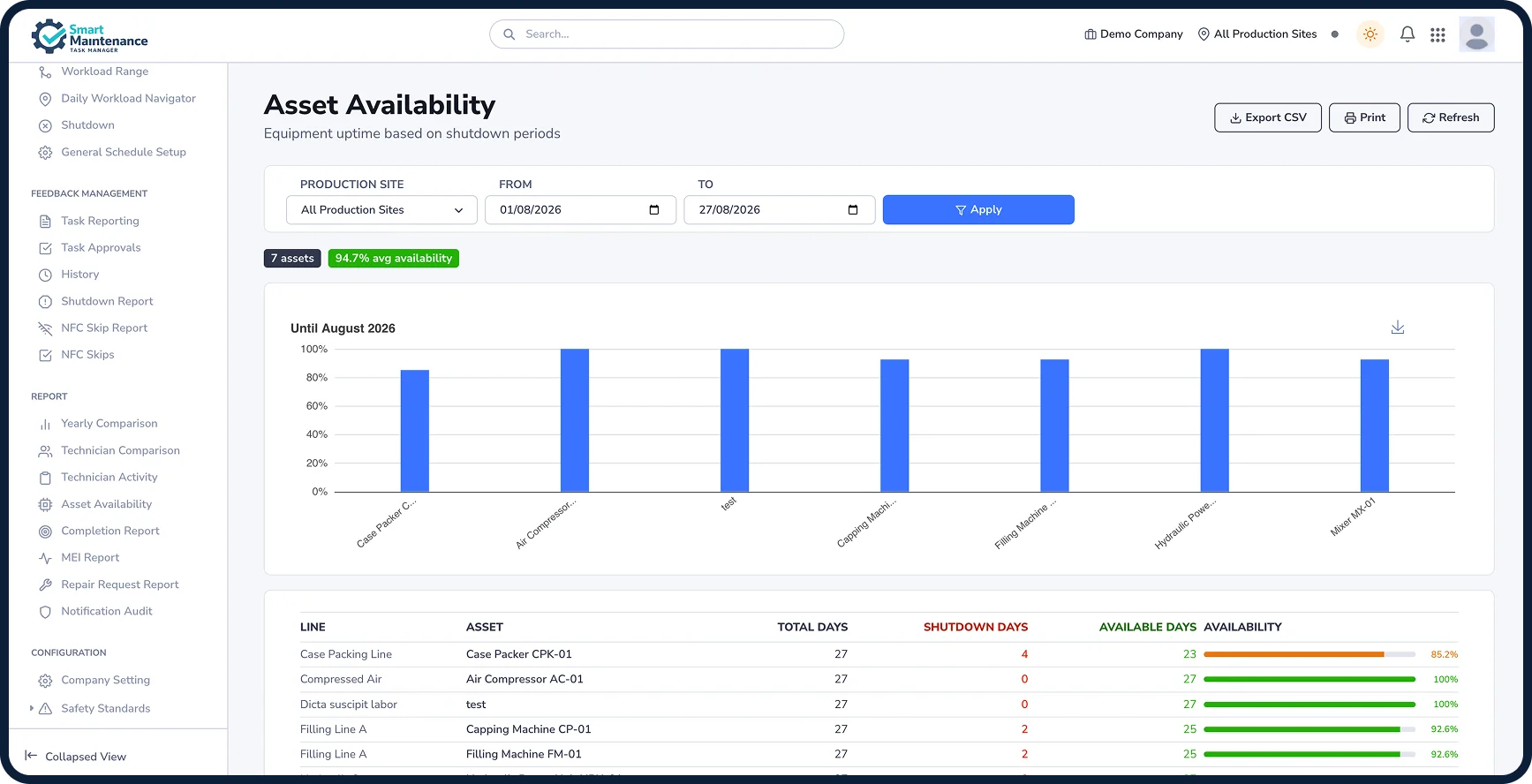
Managers get a real-time view of maintenance status on the web. Technicians execute tasks on their smartphones. Everything stays in sync.
Why Maintenance Teams Choose Smart Maintenance Task Manager
The numbers speak for themselves. Companies that switch from paper and spreadsheets to Smart Maintenance Task Manager see real results — faster.
- Cut missed maintenance
- Reduce unplanned machine downtime
- See completed work in real-time
- Schedule across multiple sites
- Full audit trail on every task
- Safety checklist before the day's first task
- Works offline in any facility
- Available in 14 languages
* Based on reported outcomes from early adopter deployments. Individual results may vary depending on facility size, maintenance maturity, and implementation scope.
A Complete Maintenance Management System
Preventive Scheduling
Recurring tasks for every machine, line, and production site
Usage-Based Maintenance
Service by running hours, distance, or cycles instead of the calendar — technicians read the counters on scheduled rounds, one task for a whole line, and every rule shows a projected due date (optional — your Admin switches it on)
Shift Planning
Shifts, rotations, and rosters — planners see who's available when assigning work, and technicians see their shifts and log time off on mobile (available on request)
Mobile App
iOS + Android app for field technicians, works offline
NFC Tags & QR Codes
Scan NFC tags or QR code labels to instantly open maintenance tasks
Built-in NFC Tester
Check the reader and any tag in seconds — type, registration, and a write-and-read self-test, right from the phone
Asset Hierarchy
5-level structure: Production Site → Line → Asset → Section → Task Point
Safety & LOTO
A daily safety checklist and a lock-out/tag-out reminder on task points that need isolation
Lubrication Management
Dedicated lubrication task types with product tracking
Inventory (optional)
Lubricant and consumable stock, per company or per site, booked automatically from the task — with low-stock alerts
Reports & Analytics
Dashboard KPIs, Maintenance Effectiveness Index (MEI), completion vs target, technician performance
Multi-site Management
Manage multiple factories and sites from one account
Reporting Chains
Record who reports to whom — technician → supervisor → manager. Limiting what each manager and supervisor sees to the sites they run is available on request
14 Languages
Arabic, Bengali, Chinese (Simplified), Dutch, English, French, German, Indonesian, Italian, Portuguese, Romanian, Spanish, Thai, Turkish
Repair Requests
Technicians report a fault with a photo from the phone; an Admin or Manager turns it into a work order, defers it to the next shutdown, or dismisses it
Shutdown Management
Formal shutdown workflows with reason logging
Shutdown & Turnaround Maintenance
Defer non-urgent repairs to the next planned stop and schedule shutdown-only tasks — planners curate the work each stop carries
Photo Evidence
Attach photos to any task as proof of the work — mandatory where you require them for a task point
Supervisor Approval
Dual sign-off: the technician completes, a supervisor or manager approves or sends it back — on the web or on the phone (optional — your Admin switches it on)
Excel Import & Export
Bulk-import your asset hierarchy from Excel and your users from a CSV file — export any time for backup or audit
Dedicated Mapping Workspace
Mappers author the full hierarchy in a dedicated tab — every action visible — while technicians keep a clean task list
Built for the Industries That Keep Things Running





What Maintenance Teams Say
Names and company details are anonymized to protect customer operational confidentiality. Feedback reflects early-adopter deployments.
“Before Smart Maintenance Task Manager, we had three whiteboards and a spreadsheet. Now our maintenance manager knows exactly what's been done on every machine — in real time.”
“The mobile app is what makes it work. Our technicians scan the machine's NFC tag, complete the checklist, and take photos. Done. No paperwork.”
“We run 3 production sites. Smart Maintenance Task Manager gives us a single dashboard to view the maintenance status across all of them. That visibility changed how we manage our operations.”
Start Managing Maintenance
The Smart Way
Replace paper forms and spreadsheets with Smart Maintenance Task Manager. Book a 30-minute demo tailored to your facility.