
Your Whole Facility, Mapped to Every Task Point
Model site → line → asset → section → task point, build and edit the hierarchy from the field even with no signal, and run multiple production sites from one account.
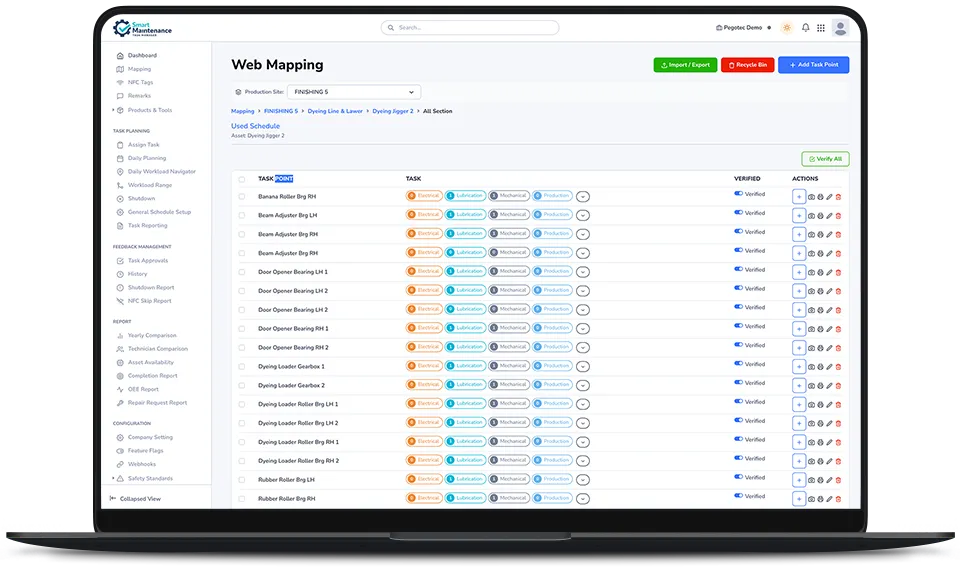
Organize Your Entire Facility, Down to Every Task Point
Smart Maintenance Task Manager uses a 5-level asset hierarchy to mirror exactly how your facility is structured. From the top-level production site all the way down to a specific lubrication point on a machine.
Every level has its own tasks, maintenance history, and status. Managers see the full picture. Technicians see exactly where to go and what to do.
- Offline-first mapping — mappers create, edit, move, reorder, and tag the full asset hierarchy from the mobile app with no connection; changes sync automatically, in order, with no duplicates
- Separate mapping & execution — a mapper-only Mapping tab with every action visible (add, edit, move, reorder, tag) keeps the technician’s task view clean
- Full maintenance history per asset (logs, photos, values)
- Attach NFC tags or QR code labels to sections for field identification
- Duplicate and reorganize the structure as your facility grows
- Excel import & export — bulk-setup from a spreadsheet, export for backup or audit
- Web mapping tool to visually browse your asset structure
- Recycle bin for accidental deletions
- Production Site-scoped mapper permissions — restrict mappers to specific production sites
One Account. Multiple Facilities. Complete Visibility.
Smart Maintenance Task Manager supports multiple production sites and facilities under a single account. Plant directors and operations managers can switch between sites and view consolidated reports.
Single Login for All Sites
Access every facility without switching accounts
Site Switcher
Switch the active site with one control, or flip to the all-sites view to compare every facility side by side
Per-Site Isolation
Each site has its own data, teams, and schedules
Cross-Site Reporting
Compare performance across sites with consolidated dashboards
From the same login
Directors get a consolidated picture across every facility; site managers stay focused on their own floor. The switcher lives in the dashboard header — one click flips between an individual production site and the all-sites view, without re-logging or re-filtering.
Capabilities in Detail
Every capability in this area, with a one-line note on what it does.
See Every Feature in a Live Demo
Our team will walk you through the platform — web and mobile — tailored to your industry and maintenance workflows.