
CMMS vs Spreadsheets: When to Replace Excel for Industrial Maintenance
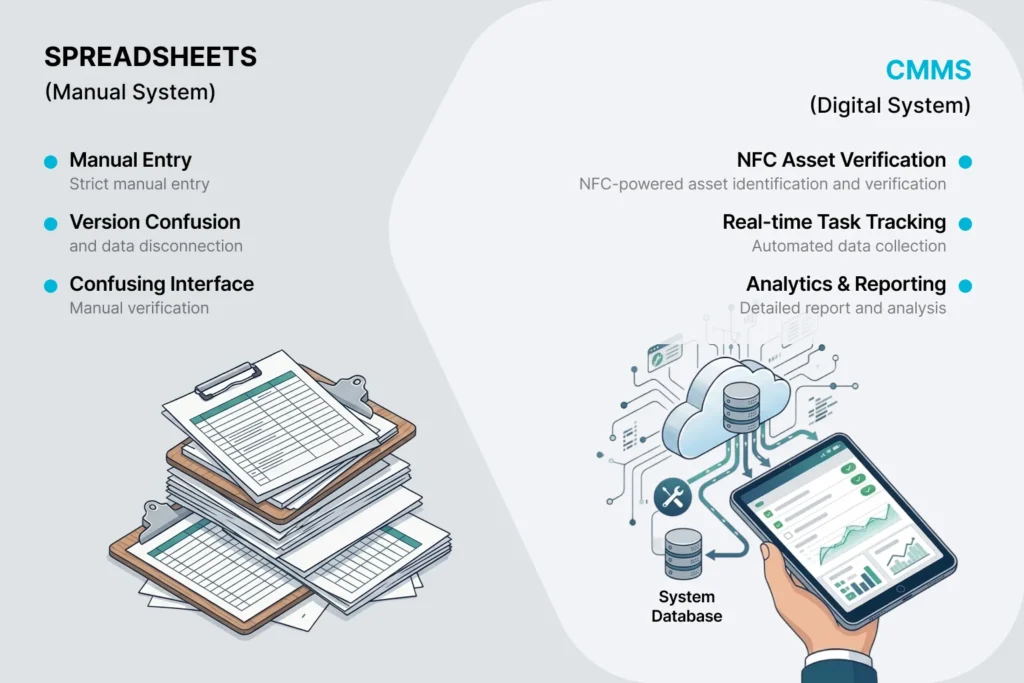
Most factories start managing maintenance the same way: a spreadsheet. Asset list in column A. Last service date in column B. Next service due in column C. Conditional formatting turns the overdue rows red. A maintenance supervisor updates it on Mondays.
It works. Until it does not.
This article is for the maintenance leader who is starting to feel the limits of spreadsheets — overdue tasks slipping through, no way to know what was actually done, audit requests that take a week to fulfil — and who is wondering whether a CMMS (Computerized Maintenance Management System) is genuinely worth it.
We will not tell you “spreadsheets are bad.” For some operations they are entirely appropriate. We will instead lay out the specific points where a spreadsheet starts costing more than the software that would replace it.
What spreadsheets are good at
Before we get to the limits, let us be honest about where Excel (or Google Sheets) holds up:
- Single-site, single-user. One person owns the maintenance schedule, updates it, and refers to it. There is no concurrency problem.
- Small asset count. Fewer than 30-50 assets, with simple schedules. The cognitive overhead of a CMMS is not justified.
- No regulatory or audit pressure. No GMP, no ISO, no insurance auditor asking for a documented maintenance trail.
- Office-only workflow. All maintenance is planned, executed, and signed off in the office. No technician needs to know what is overdue while standing in front of a machine.
If all four are true for you, stay on spreadsheets. The rest of this article does not apply.
Where spreadsheets break
1. There is no way to verify a task was actually done
When a technician marks a row “complete” in a spreadsheet, there is no enforced photo evidence, no timestamp, no GPS or NFC tag scan to prove they were at the machine. A row goes from red to green because someone typed an X. That is the entire audit trail.
We have audited paper systems where 40% of “completed” maintenance work was either not done at all or done sloppily. Spreadsheets have the same problem, just in a different medium.
A CMMS with a mobile app, NFC tag scanning, and required photo evidence closes this gap. When the technician marks “complete,” there is a record of where they were, when, and what they did.
2. Concurrent edits and version drift
The moment a second person edits the spreadsheet — maintenance manager on Monday, supervisor on Wednesday, plant manager on Friday — there is a real risk of conflicting versions, lost rows, or accidental overwrites. Excel files get emailed around with names like Maintenance_Schedule_FINAL_v3_revised.xlsx. Eventually nobody is sure which one is current.
A CMMS solves this by being the single source of truth. Multiple roles edit the same live data. There is no “FINAL_v3” — there is just the system.
3. No mobile workflow
Technicians who do the actual work do not have the spreadsheet on the factory floor. They have it on a clipboard, or as a printout taped to a noticeboard, or they ask a supervisor what to do. The closest thing to “real-time” is a phone call.
This means the spreadsheet is always out of date, the technician cannot record values, photos, or notes at the machine — they have to remember and write them up later — and follow-up items get forgotten.
A mobile CMMS app puts the schedule, the checklist, the photo capture, and the follow-up entry in the technician’s pocket. Offline-capable apps work even when the factory floor has no Wi-Fi.
4. No alerting or escalation
A spreadsheet does not call you when something is overdue. It will not email the plant manager when a critical machine has missed maintenance for 14 days. It will not escalate.
A CMMS does this natively. Overdue triggers a notification. Repeatedly overdue triggers escalation. Critical assets get attention.
5. Auditor-readiness
When an auditor — internal, customer, or regulatory — asks “show me every maintenance event on this lubricant fill in the last 18 months, with photo evidence and technician identity,” a spreadsheet cannot answer that question in under an hour. A CMMS answers it in under a minute.
If you are in food and beverage (FSMA, BRCGS), pharmaceuticals (GMP, FDA 21 CFR Part 11), automotive (IATF 16949), or any other industry with regular audits, this gap is the strongest reason to move.
6. Multi-site is essentially impossible
With one factory, a spreadsheet is uncomfortable but workable. With two factories on different shifts in different countries, a spreadsheet becomes a constant exercise in merging files and reconciling formats. By three sites, it is unmanageable.
A CMMS lets a regional or group operations manager see all sites side by side, drill down into any one, and compare KPIs across them — without manual data entry.
When the switch makes sense
We see operations switch successfully when at least two of these are true:
- More than 50 assets to track
- More than one site, or planning to add a second site
- An auditor or insurer has asked for maintenance evidence in the last 12 months
- Technicians spend significant time updating paper or going back to the office to enter data
- There is more than one supervisor or manager updating the schedule
- There have been unplanned downtime incidents traceable to skipped maintenance
- There is a safety procedure (e.g., LOTO) that requires verifiable acknowledgment before work begins
If three or more apply, a spreadsheet is the wrong tool for your current maintenance reality. Trying to engineer around it with macros, conditional formatting, and discipline will cost more than buying purpose-built software.
The transition is smaller than it looks
The most common reason maintenance leaders delay is the fear that switching is a six-month project. In practice, for a single site of around 100 assets, the transition is on the order of:
- Half a day to enter the asset hierarchy (or import from the existing spreadsheet)
- An hour per task type to define the checklist
- A morning to scan or attach NFC tags to machines
- A two-hour training session for technicians
The first complete maintenance cycle on the new system reveals more than a year of running the spreadsheet ever did. Where the gaps were. Which machines were quietly skipped. Which technicians were over-relying on memory.
Most teams find the data more uncomfortable than the transition.
How Smart Maintenance Task Manager handles the migration
If you are evaluating a CMMS replacement for your spreadsheet, here is how we typically structure the move:
- Asset import. Bring your existing asset list into the system as-is. We accept CSV/Excel with the columns you already have.
- Hierarchy refinement. Restructure the flat list into a 5-level hierarchy (Department → Production Line → Asset → Section → Task Point) so reports are meaningful.
- Task definition. Translate your spreadsheet’s “what to do” notes into structured checklists with measurements, photos, and safety acknowledgments where required.
- NFC or QR labels. Apply tags to machines. Technicians tap or scan to open the task list — no typing, no searching.
- Pilot. Run one production area or one shift on the new system for two weeks. Keep the spreadsheet alive in parallel as a fallback.
- Cutover. Retire the spreadsheet.
The whole thing typically lands in three weeks for a single site with focused execution.
Next step
If you are seeing two or more of the warning signs above, the spreadsheet is already costing you maintenance quality, audit-readiness, or production time. A 30-minute demo of Smart Maintenance Task Manager will show you exactly what your operation would look like on a purpose-built CMMS — using your asset list as the worked example.