
CMMS vs ERP Maintenance Module: Why a Dedicated Tool Wins for Factory Floors
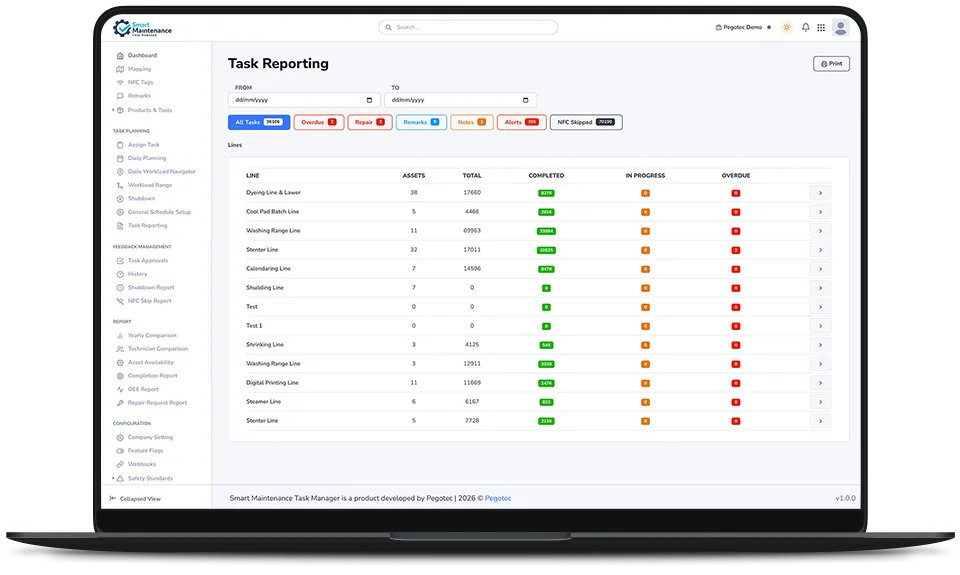
Most mid-to-large manufacturers run an ERP — SAP, Oracle, Microsoft Dynamics, Infor — and most of these systems include a maintenance module. SAP has Plant Maintenance (PM). Oracle has Enterprise Asset Management (EAM). The pitch from the ERP vendor is straightforward: “You already own the license. Why buy a separate CMMS?”
It is a reasonable question. And the honest answer is: sometimes the ERP module is the right choice. Often it is not — especially for factory-floor mobile maintenance work. This article walks through where each fits.
We have implemented Smart Maintenance Task Manager alongside SAP PM in textile and chemical operations. The two systems coexist. This is written from that experience.
What an ERP maintenance module gets right
Let us start by being fair to the alternative.
Integrated with finance, inventory, and procurement
An ERP module talks natively to the rest of the ERP. A repair part consumed during maintenance flows directly into inventory updates, purchase requisition triggers, and cost-of-maintenance allocation against the production cost center. The financial picture is automatic.
A standalone CMMS must integrate with the ERP for this to happen, adding an integration project to the maintenance project.
One vendor, one support contract
For organizations that prefer a single throat to choke, an ERP module avoids the complication of a separate SaaS vendor relationship.
Reuses existing master data
Assets, cost centers, employees, and plants are already in the ERP. The maintenance module inherits them.
Designed for capital-intensive maintenance planning
ERP modules are strong at long-horizon, high-cost maintenance planning — the annual overhaul of a turbine, the planned downtime of a chemical reactor, the work-order economics of a 6-month shutdown.
Where ERP maintenance modules struggle
These are the real-world friction points we encounter when an ERP maintenance module is asked to handle daily factory-floor maintenance.
1. The mobile experience is usually painful
ERP vendors have built mobile interfaces over the years, but most are derivatives of the desktop transaction screens. Field technicians find them slow, multi-step, dependent on stable connectivity, and visually mismatched to a one-handed gloved interaction.
A purpose-built CMMS mobile app is designed from the start for the factory-floor case: large touch targets, offline operation, NFC tag tap, photo capture, and one-handed mode. The UX gap is significant — and it is the UX gap, more than any feature gap, that determines whether technicians actually use the system or quietly route around it.
2. Offline is rarely first-class
Most ERP modules expect a connected client. They tolerate brief connectivity drops; they do not embrace the case of “this entire production hall has no Wi-Fi, sync once a shift.”
A CMMS designed for industrial maintenance assumes the worst case is the normal case: the technician executes the entire task offline, the device queues, and sync happens when reconnected.
3. Configuration complexity costs implementation time
Configuring SAP PM, Oracle EAM, or comparable modules for a new factory typically takes weeks or months of consulting engagement. The modules are designed to accommodate every imaginable industrial maintenance pattern, which means configuring them for a specific one is not fast.
A dedicated CMMS often reaches a working pilot within days—the trade-off: less flexibility for genuinely unusual workflows.
4. Cost per technician is often prohibitive at the floor level
ERP per-user licenses are typically priced for “indirect users” — managers, planners, and finance, rather than for every technician on every shift. Rolling out the maintenance module to 50 floor technicians often requires a different license model and meaningful additional cost.
CMMS pricing for floor technicians tends to be straightforward per-user-per-month and scales with the maintenance team rather than the enterprise.
5. NFC, QR, and IoT integration is bolt-on rather than native
Modern industrial maintenance increasingly relies on NFC tags on machines, QR labels, sensor integration, and IoT condition data. ERP modules generally support these via configuration and middleware. Dedicated CMMS products tend to ship with native NFC writing, QR scanning, and IoT hooks.
6. Safety procedure enforcement is generic, not specific
A LOTO gate that hard-blocks task execution until every safety step is acknowledged — common in CMMS — is usually a custom workflow in an ERP. It can be done; it is not the default.
7. UI lag and dependency on enterprise IT
ERP system changes — even small ones like adding a checklist item — typically require enterprise IT change management. CMMS configuration changes are usually handled on a self-service basis by the maintenance team.
A side-by-side decision matrix
| Question | ERP Maintenance Module | Dedicated CMMS |
|---|---|---|
| You already own the ERP licence | Significant advantage | Less of an advantage |
| Maintenance is capital-intensive, long-horizon planning | Strong fit | Less strong |
| Mobile / factory-floor execution is critical | Often weak | Designed for it |
| Offline-first technician workflow | Often weak | Standard |
| Time-to-pilot in weeks | Often months | Days to weeks |
| Per-technician licence cost | Often high | Usually moderate |
| NFC / QR / IoT native | Bolt-on | Often native |
| Safety gate (LOTO) enforcement | Configurable | Typically built-in |
| Tight integration with finance/inventory | Native | Requires integration |
| Future migration cost | High (deeply embedded) | Lower |
The hybrid pattern that often works best
In practice, the most resilient setup for a manufacturer that already runs an ERP is not “ERP module instead of CMMS” or “CMMS instead of ERP module” — it is both, with a clear division of labor:
- The ERP maintenance module includes: long-horizon planning, parts inventory, work-order economics, capital project maintenance, asset financial valuation, and integration with finance and procurement.
- CMMS owns: daily floor execution, mobile workflow, NFC tag scanning, photo evidence, safety gate enforcement, real-time supervisor view, and technician-facing checklists.
- Integration: completed task data and consumed parts data flow from CMMS to ERP daily; the ERP handles the financial and inventory consequences.
This split gives each system the role it is genuinely good at.
When the dedicated CMMS is clearly better
We see customers move floor-facing maintenance to a dedicated CMMS when:
- Technicians are consistently bypassing the ERP module in favor of paper, WhatsApp, or memory
- A safety incident or audit failure has exposed gaps in proof-of-execution
- A multi-site rollout would require a disproportionate ERP consulting budget
- Mobile execution genuinely needs to be offline-first
- The ERP rollout team and the maintenance team are not aligned on UX priorities
When the ERP module is clearly better
We tell prospects to stay on or expand the ERP module when:
- The team is small, mostly office-based, and the existing ERP usage is strong
- Maintenance is dominated by capital project work rather than daily preventive work
- Finance integration matters more than floor execution UX
- There is no existing UX-driven adoption problem to fix
- The cost of an additional vendor relationship is genuinely material
What Smart Maintenance Task Manager does with this
Our positioning is honest: we are a dedicated CMMS focused on the factory-floor execution layer. We integrate cleanly with ERP systems via APIs; we do not replace ERP maintenance modules for the parts of the workflow they excel at. If you run SAP PM and the issue is that technicians are not using it, we can pilot alongside without disrupting your existing ERP investment.
Next step
If you are weighing “extend SAP PM” vs “add a dedicated CMMS for the floor,” a 30-minute conversation with us will lay out a recommendation based on your specific setup — including the case for not buying our product if that is the right answer.