
How to Build an Asset Hierarchy for Maintenance: From Production Site to Task Point
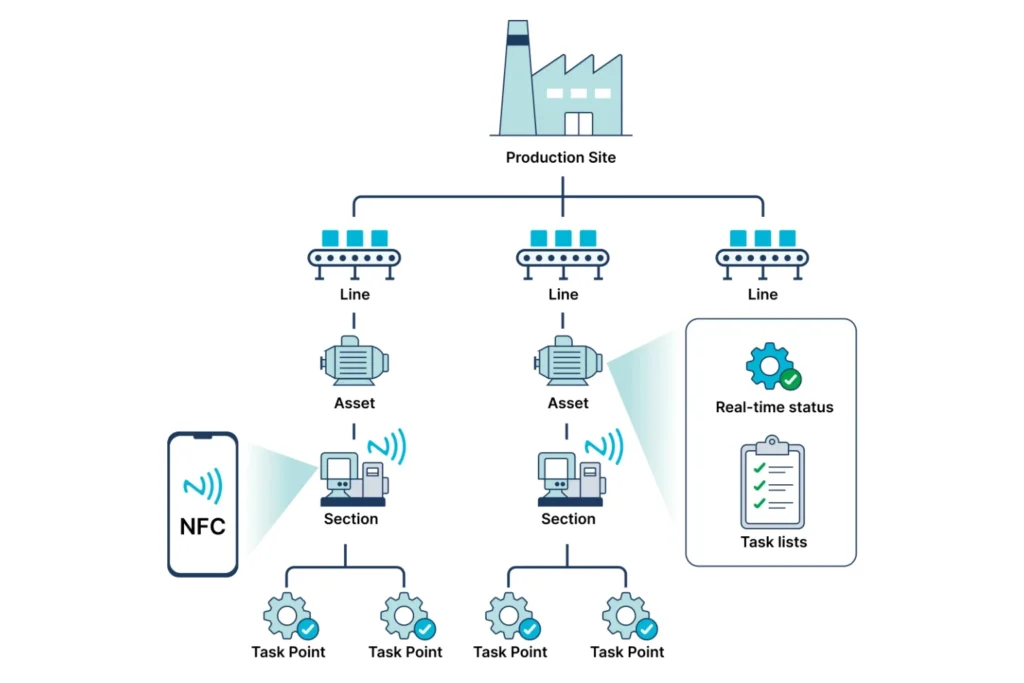
A maintenance plan is only as good as the list it is built on. If the list says “Line 3” when the work happens at a gearbox on the fourth loom, every report, every overdue task and every repair history ends up describing something too vague to act on. Getting that list right is what an asset hierarchy is for.
This guide explains what an asset hierarchy is, how many levels you need, and how to build one without spending three months on it.
What an Asset Hierarchy Is
An asset hierarchy is the structure of your plant written down as a tree: sites contain lines, lines contain machines, and machines contain the parts that need attention. Each piece of maintenance work hangs from one place in that tree.
It does three jobs at once. A technician can find the right place to work. A manager can add up work and problems at any level, from one machine to a whole site. And when a machine fails for the third time this year, its history is all in one place.
How Many Levels Do You Need?
Five levels fit most plants, because they follow how a plant is actually laid out and how a technician moves through it:
- Production site: the factory or location. Example: Weaving Hall A.
- Line: the group of machines that work together. Example: Loom Line 3.
- Asset: the individual machine. Example: Rapier Loom #12.
- Section: the part of the machine that gets its own attention. Example: Gear Box.
- Task point: the exact place where the work happens. Example: Lubrication Point A.
The test for any level is simple: does somebody do something different because this level exists? If two levels always get the same answer, you only need one of them. If technicians keep writing “the left bearing” in their notes, you are missing one.
How to Build It in Six Steps
1. Walk the Plant Before You Open a Spreadsheet
Take the most experienced technician with you and walk one line from end to end. The asset register in your accounting system lists what the company owns, which is rarely the same as what needs maintaining. It may hold a single entry for a line of forty machines.
2. Agree on Names Before Anyone Types
Pick one rule and write it down: machine type, then number, in the same order everywhere. Use the name people say on the shop floor, and avoid names tied to a person or to a location that may change. Renaming later is easy in software, but habits are harder to shift.
3. Start With One Line
Map one line completely, then run real work on it for two weeks. You will learn more about the right depth and the right names from those two weeks than from any planning meeting, and fixing one line is much cheaper than fixing a whole site.
4. Go Only as Deep as the Work
A conveyor with one monthly check does not need ten task points. A gearbox with six grease points and an oil level does. Let the existing work decide the depth, machine by machine, and accept that the tree will not look symmetrical.
5. Put the Tag Where the Work Happens
If you use NFC tags or QR labels, mount them at the level the technician needs to open: on the task point when the visit itself matters, on the machine when it does not. Our article on what a scan proves goes into that choice.
6. Keep It Alive
Plants change: machines move, lines get rebuilt, and old equipment goes. Give one person the job of updating the tree, and make sure a moved machine keeps its history rather than starting again.
Mistakes That Cost the Most to Undo
- Too deep, too soon. Listing every bolt before any work has run means nobody can maintain the list.
- Too shallow. One entry for a whole line means you can never see which machine causes the trouble.
- Mixing location and equipment. “Compressor Room” is a place, and “Compressor #4” is a machine. Keep each at its own level.
- Two names for one machine. Duplicates split the history in two, and nobody notices until a report looks wrong.
How This Works in Smart Maintenance Task Manager
Smart Maintenance Task Manager uses the five levels above: production site, line, asset, section and task point. A mapper can build the structure from the web dashboard, or on site from the phone while standing at the machine. An existing list can come in from Excel, and the structure can go back out the same way. Machines can be moved and reordered as the plant changes, and several production sites can run from one account.
Each task point then carries its own work, such as a lubricant, quantity and interval, so the plan matches what the technician actually walks past. There is more detail on the asset management page, or book a demo and bring a list of one of your lines.